How to Make a 2x2 Piston Door in Minecraft: Flush Design
A 2x2 piston door is four sticky pistons in a wall around a 2x2 doorway. Parts list, the torch inverter that holds it shut, plate wiring, and fixes.
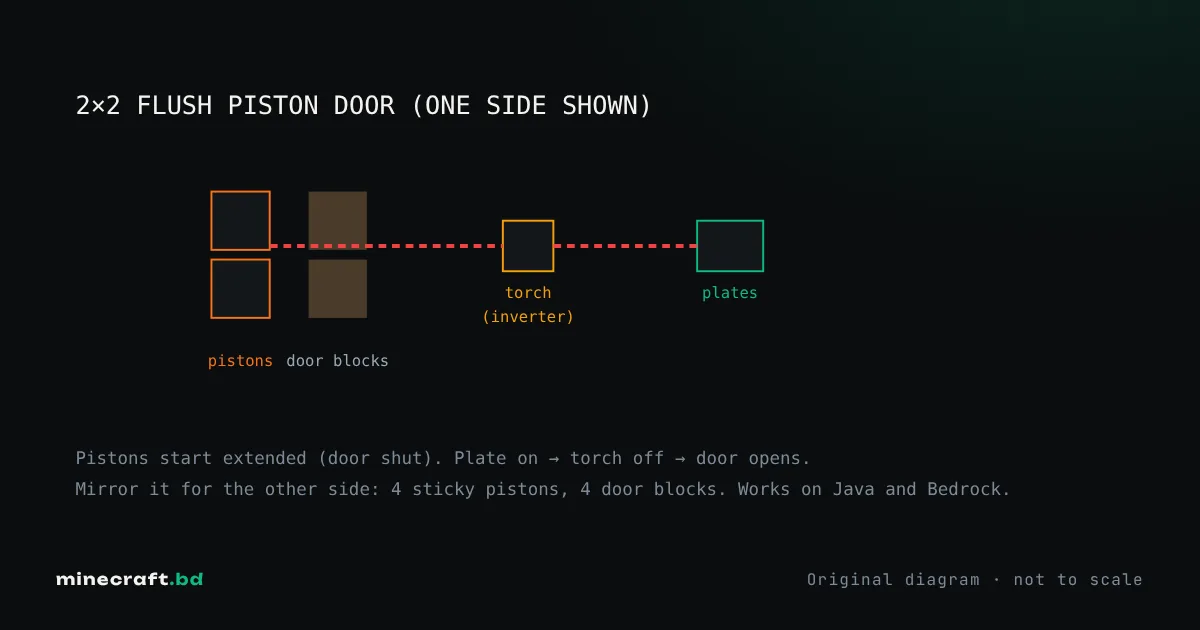
A 2x2 piston door is four sticky pistons hidden in a wall, two on each side of a 2-wide, 2-tall doorway. While the pistons are powered they push four blocks into the doorway and the wall looks solid. Step on a pressure plate and the power cuts out, the pistons pull the blocks back into the wall, and the doorway opens. The trick that makes it work is a redstone torch acting as an inverter: power is on by default, and your input switches it off.
If terms like “inverter” or “strongly powered” are new, skim redstone basics first. This build uses nothing beyond it.
What you need for a 2x2 piston door
- 4 sticky pistons (normal pistons won’t pull the blocks back)
- 4 door blocks that match your wall. Any block pistons can move: stone, planks, bricks. Not obsidian.
- 2 redstone torches
- 4 extra solid blocks for the control setup (any full block)
- 2 pressure plates (or a lever)
- Redstone dust, about 20 to 30 pieces depending on your wall. Get more from redstone ore.
How it fits together
Picture the wall from the front. The doorway is 2 blocks wide and 2 tall. On each side, working outward from the doorway:
- Door block column (2 blocks tall). When the door is open these sit in the wall, flush with it. When it’s closed they’ve been pushed into the doorway.
- Sticky piston column (2 pistons stacked), facing the doorway.
- Torch column: a redstone torch at the height of the bottom piston, with a solid block directly above it, next to the top piston.
- Control block: the block the torch is attached to, on its far side.
The torch powers the bottom piston beside it. It also strongly powers the block on top of it, and that block powers the top piston. So one torch runs both pistons on its side. When the control block receives a signal, the torch turns off and both pistons retract.
Building it
Work on one side first, then mirror it.
- Dig out the space. Clear the doorway and three blocks into the wall on each side, two blocks high.
- Place the pistons. Put the bottom sticky piston in the wall with a one-block gap between it and the doorway, facing the doorway. Stack the second one on top of it, also facing the doorway.
- Put the door blocks on the piston faces. One block on the front of each piston, in the gap between piston and doorway.
- Place the control block two blocks behind the bottom piston, leaving one empty space between them. If you only dug three blocks deep, the original wall block there already does the job.
- Place the torch on the side of the control block, so it sits in that empty space right behind the bottom piston. The bottom piston should fire straight away and push its block into the doorway.
- Place a solid block on top of the torch. It sits right behind the top piston, which should now fire too.
- Repeat on the other side. You now have a closed 2x2 wall.
Wiring the input
Now connect a pressure plate on each side of the door to both control blocks.
- Place a pressure plate on the floor in front of the door on the outside, and another on the inside.
- The block under a pressure plate is strongly powered while someone stands on it, so redstone dust touching that block from the side picks up the signal.
- Run dust from each plate’s block to both control blocks, ending with the dust running straight into the back of each control block at torch height. Don’t put dust on top of a control block: it would sit next to the powered block above the torch, switch the torch off, and the door would flicker until the torch burns out. Dust from both plates can join into one line.
- Keep the dust away from the pistons and the block above each torch. Dust that touches a piston can power it directly and keep the door shut.
A signal fades after 15 blocks of dust. If your route around the wall is longer, add a repeater partway along. Build it visible the first time; once it works, dig the wiring one block lower and put the plates on blocks sunk to match, so nothing shows.
When it doesn’t work
- Pistons extend but don’t pull back: you used regular pistons, or the torch isn’t turning off. Check that the dust actually reaches the control block (step on the plate and watch the dust light up).
- Only the bottom piston moves: the block above the torch is missing or isn’t a full solid block, so it can’t carry power to the top piston.
- Door won’t close when you step off: dust is touching a piston or a powered block is next to one. Trace every piece of dust near the pistons.
- Door closes on you: pressure plates release about a second after you step off. Walk through without stopping, or add repeaters on the line to hold the door open a little longer.
Java and Bedrock
This design behaves the same on both editions, because it uses only torch power and plain dust. Many bigger designs don’t. Java builds often depend on quasi-connectivity or on sticky pistons dropping their block during a very short pulse, and neither happens on Bedrock. Bedrock pistons, in turn, can move chests, which Java’s can’t. Once you’ve built this one, the same inverter idea scales to 3x3 doors and stairs that fold into the floor, but take those designs from a tutorial made for your edition. For more things to build around your new entrance, see building ideas for beginners.
Common questions
Why won't my piston door close (or open)?
Check that you used sticky pistons, that each torch is on the control block and not on a piston, and that no redstone dust is touching the pistons directly. Dust next to a piston can keep it powered when it shouldn't be.
Does this piston door work on Bedrock?
Yes. This design avoids quasi-connectivity and short-pulse tricks, so it behaves the same on Java and Bedrock. Bigger 3x3 and hidden doors often don't, so use tutorials made for your edition for those.
Can I use a lever or button instead of pressure plates?
Yes. A lever makes a door that stays open until you flip it back. A button opens it for about a second, which is usually too short to walk through; add repeaters set to 4 to stretch the pulse, or use plates.
Sources & verification
Facts on this page are checked against these references and in-game behavior for the stated edition(s). how we verify.
Keep reading