How to Use Redstone in Minecraft: 4 Circuits to Start
A power source sends a signal at strength 15 and dust carries it 15 blocks. How to use redstone: repeaters, comparators and four first circuits.
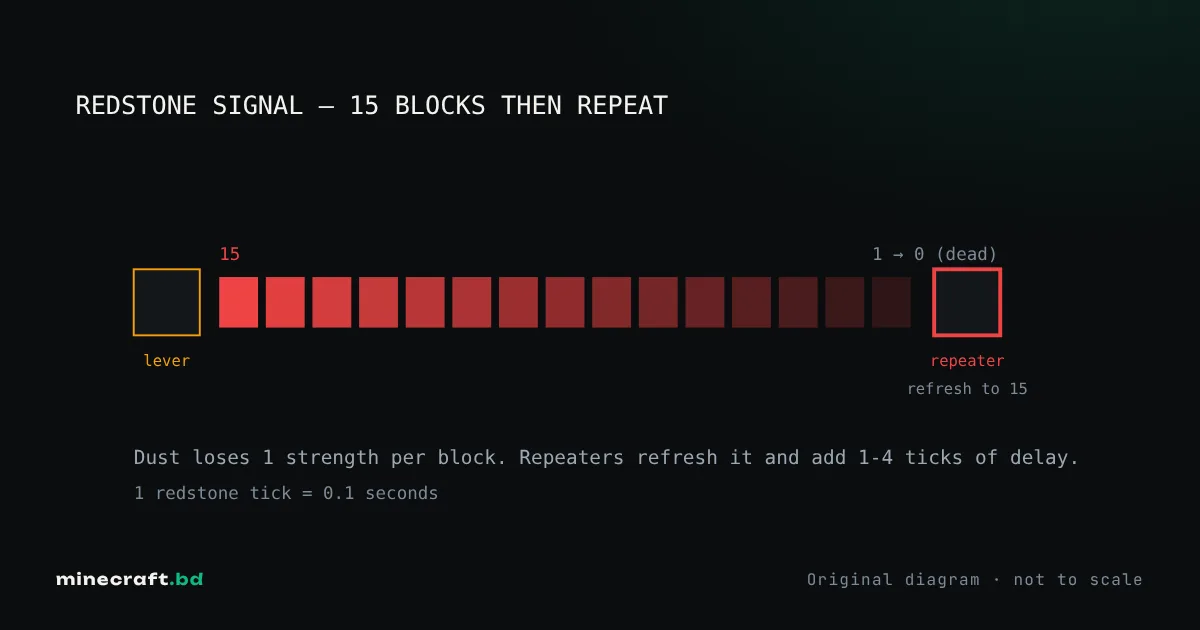
Redstone works like simple electricity. A power source (lever, button, torch, pressure plate, observer and others) sends out a signal at strength 15. Redstone dust carries it, losing one level of strength per block, so a signal dies after 15 blocks. Whatever is at the other end, a door, piston, lamp or dispenser, turns on while it receives any signal above zero. Almost everything else is detail on top of those three ideas.
You need redstone dust to start. It drops from redstone ore, which is most common deep underground.
Power sources
| Source | What it gives |
|---|---|
| Lever | Steady on or off until you flip it again |
| Button | A short pulse (stone buttons are shorter than wooden ones) |
| Pressure plate | On while something stands on it |
| Redstone torch | Always on, unless the block it’s attached to is powered |
| Block of redstone | Always on, can be pushed by pistons |
| Observer | A short pulse when the block in front of it changes |
| Daylight detector | Strength that follows the sun (or the moon, when inverted) |
| Target block | A pulse when hit by an arrow or other projectile |
The redstone torch is the important one. Because it turns off when its block is powered, it acts as an inverter (a NOT gate), and every “power is on until you step on the plate” design depends on it.
How signals travel
Dust weakens. Each block of dust after the source drops the strength by one: 15, 14, 13 and so on. At 0 nothing happens. The diagram on this page shows a 15-block line.
Dust points. A line of dust powers the block it runs into and the block it sits on. Dust next to a door but not pointing at it won’t open it. A single piece of dust with no connections forms a cross that powers in all four directions.
Strong vs weak power. A block can be powered two ways:
- Strongly, by a repeater or comparator pointing into it, a torch underneath it, or a lever or button attached to it. A strongly powered block powers dust next to it as well as mechanisms.
- Weakly, by dust pointing into it or on top of it. A weakly powered block activates mechanisms next to it (a lamp, a piston) but won’t pass power to more dust.
This is why a line of dust “stops” at a block sometimes and continues other times. If a signal won’t go through a block, put a repeater before it.
Repeaters and comparators
A repeater does three jobs. It boosts any incoming signal back to 15, it adds a delay of 1 to 4 redstone ticks (right-click to change it), and it only passes signals in one direction, so it stops signals from leaking backwards. Power a repeater from the side with another repeater and it locks in its current state, which is the basis of simple memory circuits.
A comparator keeps the signal’s strength instead of boosting it. In normal mode it passes the rear signal only if it’s at least as strong as the signal coming in from the side. Right-click it and the front torch lights up: now it subtracts the side signal from the rear one. Point it out of a chest, hopper or furnace and it outputs a signal based on how full the container is, which is how item sorters work.
Timing
Minecraft runs at 20 game ticks per second. A redstone tick is two game ticks, 0.1 seconds. A repeater set to 4 adds 0.4 seconds. Pistons take a moment to extend, and observers output a very short pulse. When a build works “sometimes”, the cause is almost always timing, and a repeater set one notch higher usually fixes it.
Four circuits to build first
1. Hidden lamp switch. A lever on one side of a wall, dust under the floor and a redstone lamp on the other side. You’ll learn how dust connects to things and how far it reaches.
2. Torch inverter. A block with a redstone torch on its side. Run dust from a lever into the block. Lever off: torch on. Lever on: torch off. Hook the torch output to a lamp and you have a light that turns off when you flip the switch. This is the logic inside the piston door.
3. Vertical signal (torch tower). Stack block, torch on top, block, torch on top. Each torch powers the block above it, which turns the next torch off, so the output alternates on and off as it goes up. Count the levels to get the output you want, or just run dust up a staircase of blocks if you need a steady signal.
4. Observer clock. Place two observers facing each other. Each one sees the other change and pulses, forever. It’s the simplest clock in the game; break one observer to stop it. Feed the pulse into a dispenser or a piston to see it work.
Edition differences worth knowing early
The basics above work the same on Java and Bedrock. A few advanced behaviors don’t:
- Quasi-connectivity (Java only): pistons, droppers and dispensers can be powered by a signal that would power the space directly above them. Lots of Java builds rely on this; on Bedrock they simply don’t fire.
- Sticky pistons (Java only): a pulse shorter than the piston’s movement makes a sticky piston leave its block behind. Bedrock pistons don’t do this.
- Moving containers (Bedrock only): Bedrock pistons can push chests, furnaces and other blocks that hold items. Java pistons can’t.
Keep those in mind when copying a design from a video. When you want the next step, the piston door is the classic first real build, and the redstone hub lists every component guide.
Common questions
How far does a redstone signal travel?
15 blocks of dust. A power source gives strength 15 and each block of dust lowers it by one, so the signal dies after 15 blocks. Put a repeater in the line to boost it back to 15.
What is a redstone tick?
A redstone tick is 0.1 seconds, or two game ticks at the normal 20 game ticks per second. Repeater delays are set in redstone ticks, from 1 to 4.
Does redstone work the same on Java and Bedrock?
The basics do. Advanced behavior differs: quasi-connectivity and sticky piston block-dropping are Java-only, and Bedrock pistons can move containers. Copy complex designs only from tutorials for your edition.
Sources & verification
Facts on this page are checked against these references and in-game behavior for the stated edition(s). how we verify.
Keep reading