How to Make an Armor Stand in Minecraft and Pose It
Six sticks and 1 smooth stone slab make an armor stand. How to make an armor stand in Minecraft, get the slab, add gear and pose it on either edition.
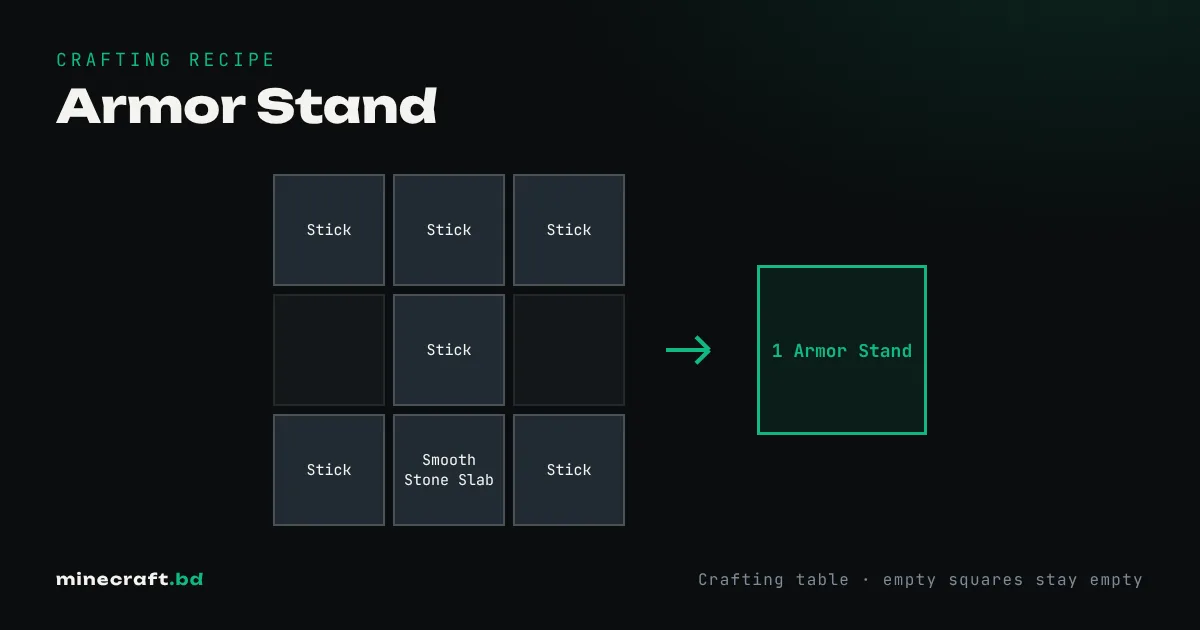
Fill the top row of a crafting table with 3 sticks, put 1 stick in the center slot, then place 1 stick, 1 smooth stone slab and 1 stick across the bottom row. That makes 1 armor stand, on Java and Bedrock alike.
The slab is the part that trips people up. It has to be a smooth stone slab: a regular stone slab or a cobblestone slab won’t work.
Making the smooth stone slab
Smooth stone takes two trips through a furnace:
- Smelt cobblestone into stone.
- Smelt that stone into smooth stone (the pale gray block with a border).
- Put 3 smooth stone in a row to get 6 smooth stone slabs, or put 1 smooth stone in a stonecutter for 2 slabs.
The stonecutter is the cheaper route if you only need one or two stands. Either way, one batch of slabs covers several stands.
For the six sticks, craft 4 planks into sticks (2 planks make 4) and you’ll have 2 spare.
Putting gear on it
Right-click (or tap) the stand while holding a piece of armor and it puts it on. Using it with an empty hand takes the item back off the slot you aim at. A stand holds:
- a helmet, mob head or carved pumpkin
- a chestplate or elytra
- leggings and boots
Any armor works, from leather to netherite, including armor with trims, so a stand is the best way to display a full set. Dispensers can equip armor onto a stand in front of them, which is how armor-swap rooms work: walk in, and your gear goes on or comes off automatically.
Arms, hands and poses
This is where the editions split.
Bedrock stands have arms by default and can hold an item in the main hand and a shield or other item in the off hand. Sneak and use the stand (or tap the Pose button on mobile) to cycle through its 13 poses. A redstone signal next to it changes the pose too, which makes for simple animated displays.
Java stands placed in survival have no arms and can’t be posed in game. Hand items and poses need commands. To summon one with arms:
/summon armor_stand ~ ~ ~ {ShowArms:1b}
You can add tags like Small:1b for a small stand, NoBasePlate:1b to hide the base, or Invisible:1b to show only the gear. See the summon command guide for how the syntax works.
Placing and breaking
When you place a stand, it faces you, snapping to one of 8 directions. To aim it a particular way, stand where you want it to look from.
Hit it twice quickly to break it. It drops as an item together with whatever it was wearing. Explosions and firework rockets destroy it without dropping the stand. On Java a stand has 20 health, so a single hit only makes it wobble; on Bedrock it has 6.
Stack sizes differ: 16 per slot on Java, 64 on Bedrock.
What they’re good for
- Armor storage: one stand per set by your bed or ender chest. A set of chainmail armor or full netherite looks good on display.
- Decoration: shops, museums, scarecrows with a carved pumpkin head, and statues on Bedrock where you can pose them.
- Testing: stands take knockback and can be pushed by pistons and water, and on Java zoglins attack them, so builders use them to test traps.
Common questions
How do you give an armor stand arms?
On Bedrock, armor stands have arms already. On Java you need a command, for example /summon armor_stand ~ ~ ~ {ShowArms:1b}, since survival-placed stands have no arms.
How do you change an armor stand's pose?
On Bedrock, sneak and use the stand (or tap Pose on mobile) to cycle through its poses, or power it with redstone. Java has no in-game posing; poses are set with commands.
Why can't I make an armor stand with a stone slab?
The recipe needs a smooth stone slab, not a regular stone slab or cobblestone slab. Smelt stone into smooth stone first, then make the slab.
Sources & verification
Facts on this page are checked against these references and in-game behavior for the stated edition(s). how we verify.
Keep reading