How to Make a Banner in Minecraft: Recipe and Loom Designs
Six wool of one color and a stick make a banner. How to make a banner in Minecraft, add up to 6 pattern layers on a loom, and put your design on a shield.
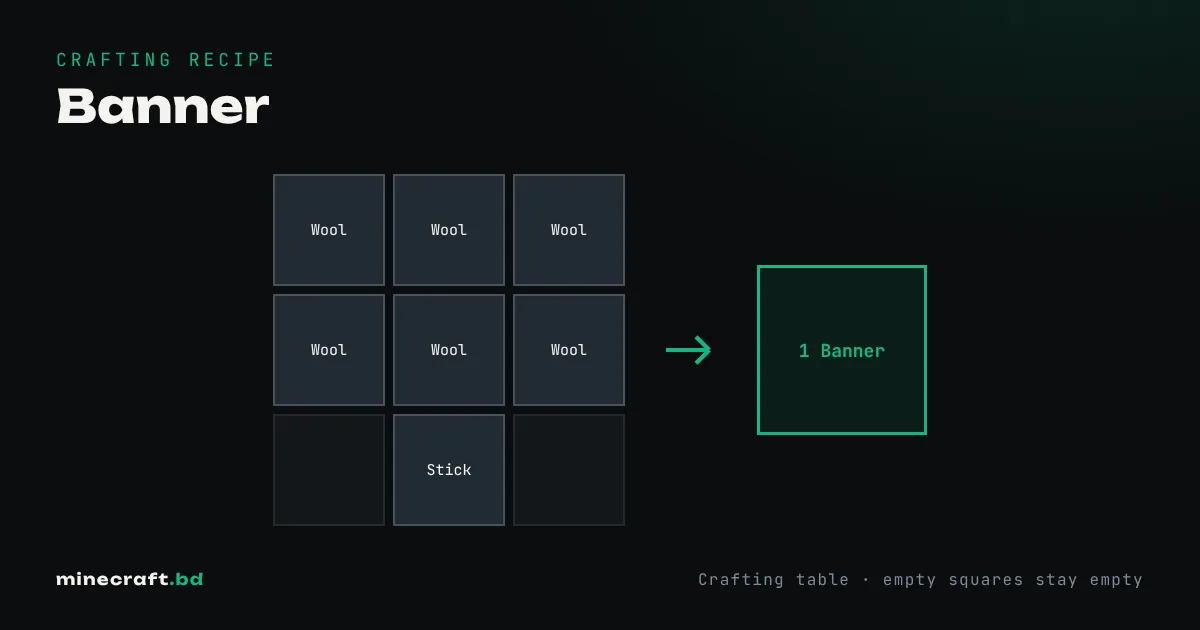
A banner is 6 wool of the same color and 1 stick: fill the top two rows of a crafting table with wool and put the stick in the bottom middle. The wool color becomes the banner’s base color. To add patterns, use a loom.
The base banner
All six wool must match. White is easiest because white sheep are the most common, but you can dye wool any of the 16 colors first, or dye the sheep and shear it. A sheep farm with a few dyed sheep keeps colored wool coming. The base color can’t be changed after crafting, so pick it before you craft.
Banners stack to 16 and can be placed on the ground (standing) or on a wall (hanging).
Adding patterns with a loom
A loom is 2 string over 2 planks. Open it and you’ll see three input slots:
- Banner on the left.
- Dye in the middle. Each pattern layer uses one dye.
- Banner pattern item, optional, for special designs.
Pick a pattern from the list, take the result, and repeat for the next layer. You can stack up to six layers in survival. Layers go on top of each other in order, so plan from the background forward: big stripes and fields first, small details last.
The loom is cheap compared to the crafting grid. On Bedrock you can still craft most patterns in a crafting table, but it uses more dye and you can’t preview the result.
Special pattern items
Some designs need a banner pattern item in the loom’s third slot. It isn’t used up, so you only need one of each.
- Flower Charge: paper and an oxeye daisy.
- Creeper Charge: paper and a creeper head.
- Skull Charge: paper and a wither skeleton skull.
- Thing (the Mojang logo): paper and an enchanted golden apple.
- Field Masoned: paper and bricks.
- Bordure Indented: paper and vines.
- Globe: bought from a master cartographer.
- Snout: found in bastion remnant chests.
- Flow and Guster: from trial chamber vaults.
Banners on shields
Craft a banner together with a shield to copy the design onto the shield. The banner is used up, and the shield keeps its durability and enchantments. Only a shield without a pattern can take one. Custom shields has design ideas.
Banners on maps (Java)
On Java, hold a filled map and use it on a placed banner. A marker in the banner’s color appears on the map at that spot, and if you renamed the banner on an anvil, its name shows too. Use the map on the banner again to remove the marker. Bedrock doesn’t have banner markers.
The ominous banner
Pillager captains carry a gray-and-black ominous banner. It’s a separate item; you can’t make it in a loom, but killing a captain drops it. It’s a popular trophy for raid-themed builds.
Removing layers
Use a banner on a cauldron full of water to wash off the top layer. Repeat to strip it down. On Bedrock, bleach removes all color and turns it back into a plain white banner.
Common questions
How many patterns can a banner have?
Six layers in survival, in both editions. The base color from the wool does not count as a layer.
Can you change a banner's base color?
No. The base color comes from the wool you craft it with and stays for good. On Bedrock you can bleach a banner back to white, but otherwise you need to craft a new one.
How do you remove a pattern from a banner?
Use the banner on a water-filled cauldron. Each use removes the top layer and uses some of the water.
How do you put a banner on a shield?
Put a shield with no pattern and a banner in a crafting grid. The banner is used up and the shield takes its design, keeping its durability and enchantments.
Sources & verification
Facts on this page are checked against these references and in-game behavior for the stated edition(s). how we verify.
Keep reading